

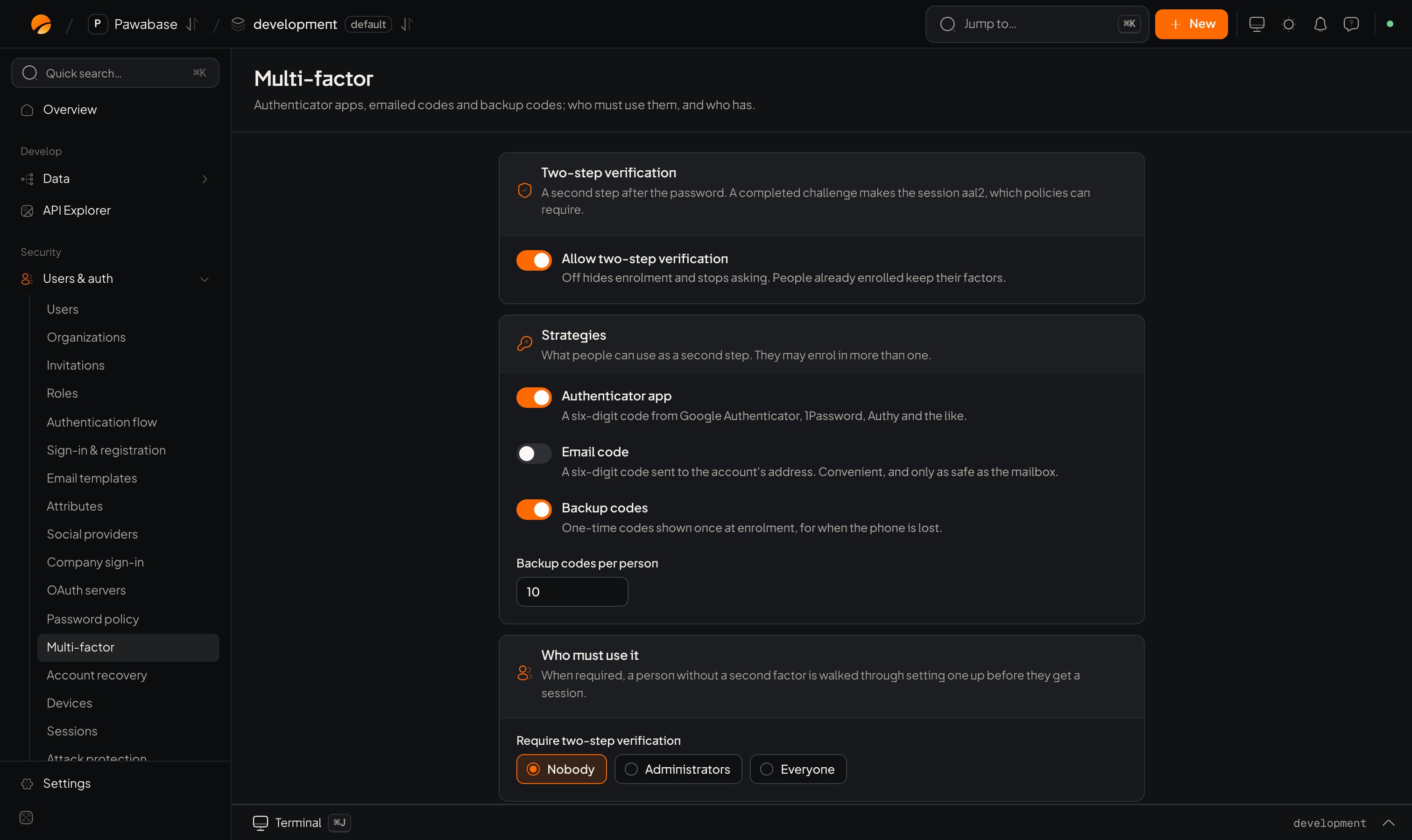
Users & auth → Multi-factor: strategies and who must use them.
aal2 (the first step alone is aal1). Your access rules can require aal2 for sensitive actions, with the mfa shorthand.
In Studio
Users & auth → Security → Multi-factor.Two-step verification
Strategies
What people can use as a second step. They may enrol in more than one.Who must use it
When required, a person without a second factor is walked through setting one up before they get a session.People
An Enrolled / Not enrolled list of everyone. Reset removes a person’s second factors so they can sign in with a password alone and enrol again. Use it for someone who lost their phone and their backup codes, after confirming who they are.Let a person enrol (authenticator app)
1
Start enrolment
The server makes a secret. Show it as a QR code and as text.
2
Confirm with a code
The person scans the QR code, then types the code their app shows. Pawabase checks it and switches two-step on.
3
Save backup codes
You receive one-time recovery codes once. Make the person save them.
pawabase.auth.mfa.enrollEmail() (enroll_email()), then confirm with the code that arrives.
Sign in with a second step
When an account has two-step verification, the first factor doesn’t finish. It returnsmfa_required with a verify function:
signInWithPassword, verifyEmailCode, verifyMagicLink, social return and passkeys. Handle it in one place.
A wrong code is an AuthenticationError. Allow a few retries and offer “use a backup code”. To send the email code on demand, call pawabase.auth.mfa.challenge(result.mfaToken).
When enrolment is required
With Require two-step verification on, a person without a factor is walked through setting one up before they get a session. Use the step calls with themfaToken from the sign-in result: startSetup({ mfaToken, method: "totp" | "email" }), then completeSetup({ mfaToken, code }), which returns recovery codes and a session.
Check, turn off, and new backup codes
Require it for sensitive actions
Useaal2 in an access rule to ask for a second step only where it matters:
Choose All of: Users with role admin; Signed in with 2FA in the rule picker.
If a person who is aal1 hits that rule, your app should send them through a step-up: prompt for a code with mfa.challenge and result.verify.
Auth events
user.mfa_enabled, user.mfa_disabled and user.mfa_reset are emitted for webhooks so you can notify people or alert your team.
Devices
Remember trusted devices.
Account recovery
Lost passwords and phones.